> For the complete documentation index, see [llms.txt](https://universe.titan.tf/llms.txt). Markdown versions of documentation pages are available by appending `.md` to page URLs; this page is available as [Markdown](https://universe.titan.tf/faq.md).
# FAQ
A non-exhaustive list of frequently asked questions, answered.
##  What are gems?
Gems is a powerful currency used on our servers. They drop one to you for every 3 minutes spent on any server.
They can purchase all sorts of resources from Titan credits to TF2 items. Check out the Gems Exchange with the link below to discover what you can do with gems.
{% content-ref url="/pages/-LT8yTNevbtRCia-IA3Y" %}
[Broken mention](broken://pages/-LT8yTNevbtRCia-IA3Y)
{% endcontent-ref %}
##
What are gems?
Gems is a powerful currency used on our servers. They drop one to you for every 3 minutes spent on any server.
They can purchase all sorts of resources from Titan credits to TF2 items. Check out the Gems Exchange with the link below to discover what you can do with gems.
{% content-ref url="/pages/-LT8yTNevbtRCia-IA3Y" %}
[Broken mention](broken://pages/-LT8yTNevbtRCia-IA3Y)
{% endcontent-ref %}
##  How do I buy items?
Most items are purchasable with Titan credits.
Once you have Titan credits, you can either type `!shop` whilst in a server or visit the[ Item Shop](https://titan.tf/shop) on a browser to look for items.
##
How do I buy items?
Most items are purchasable with Titan credits.
Once you have Titan credits, you can either type `!shop` whilst in a server or visit the[ Item Shop](https://titan.tf/shop) on a browser to look for items.
##  I cannot buy anything from the item shop!
You have do not have enough Titan credits to purchase the item you are trying to purchase.
##
I cannot buy anything from the item shop!
You have do not have enough Titan credits to purchase the item you are trying to purchase.
##  The items I bought are not playing any sounds?
You have to install our custom content pack in order to hear custom sounds.
You can do so by clicking [here](steam://connect/download.titan.tf:11111) which will connect you to our content distributor server. The server will automatically install the content pack for you.
For more information, visit this link.
{% content-ref url="/pages/-LkruvmOfVOsVZf7vmrO" %}
[Content Pack](/items/content-packs.md)
{% endcontent-ref %}
##
The items I bought are not playing any sounds?
You have to install our custom content pack in order to hear custom sounds.
You can do so by clicking [here](steam://connect/download.titan.tf:11111) which will connect you to our content distributor server. The server will automatically install the content pack for you.
For more information, visit this link.
{% content-ref url="/pages/-LkruvmOfVOsVZf7vmrO" %}
[Content Pack](/items/content-packs.md)
{% endcontent-ref %}
##  What are levels?
Levels are derived from the total amount of experience points you have earned so far. A wide range of activities from just playing, to winning a round, grants you experience points.
The first 3,000+ levels will give you a unique and special level badge tag in front of your name.
#### Level Tiers
Your level is transformed into a badge with upgradable colors and stars. The higher your level, the more stars you get. These stars are also known as prestige, where every star equates to 100 levels. Each time you reach a significant leveling milestone, you unlock a new level tier. This badge can be used via the in-game `!settings` menu under the "Chat" section.
##
What are levels?
Levels are derived from the total amount of experience points you have earned so far. A wide range of activities from just playing, to winning a round, grants you experience points.
The first 3,000+ levels will give you a unique and special level badge tag in front of your name.
#### Level Tiers
Your level is transformed into a badge with upgradable colors and stars. The higher your level, the more stars you get. These stars are also known as prestige, where every star equates to 100 levels. Each time you reach a significant leveling milestone, you unlock a new level tier. This badge can be used via the in-game `!settings` menu under the "Chat" section.
##  What are chests?
One of the few ways to obtain chests is by earning experience points and leveling up. Some exclusive event chests may have a different name and can be obtained in other means.\
\
Opening a chest will give you a random item from the pool of items that the chest is tied to.
##
What are chests?
One of the few ways to obtain chests is by earning experience points and leveling up. Some exclusive event chests may have a different name and can be obtained in other means.\
\
Opening a chest will give you a random item from the pool of items that the chest is tied to.
##  How do I mute someone?
1. Press `Esc` to bring up the main menu while connected to a server.
How do I mute someone?
1. Press `Esc` to bring up the main menu while connected to a server.
2. Click the mute players icon at the bottom of the screen (Looks like an ear with an X in it).\

3. Find the person's name.\
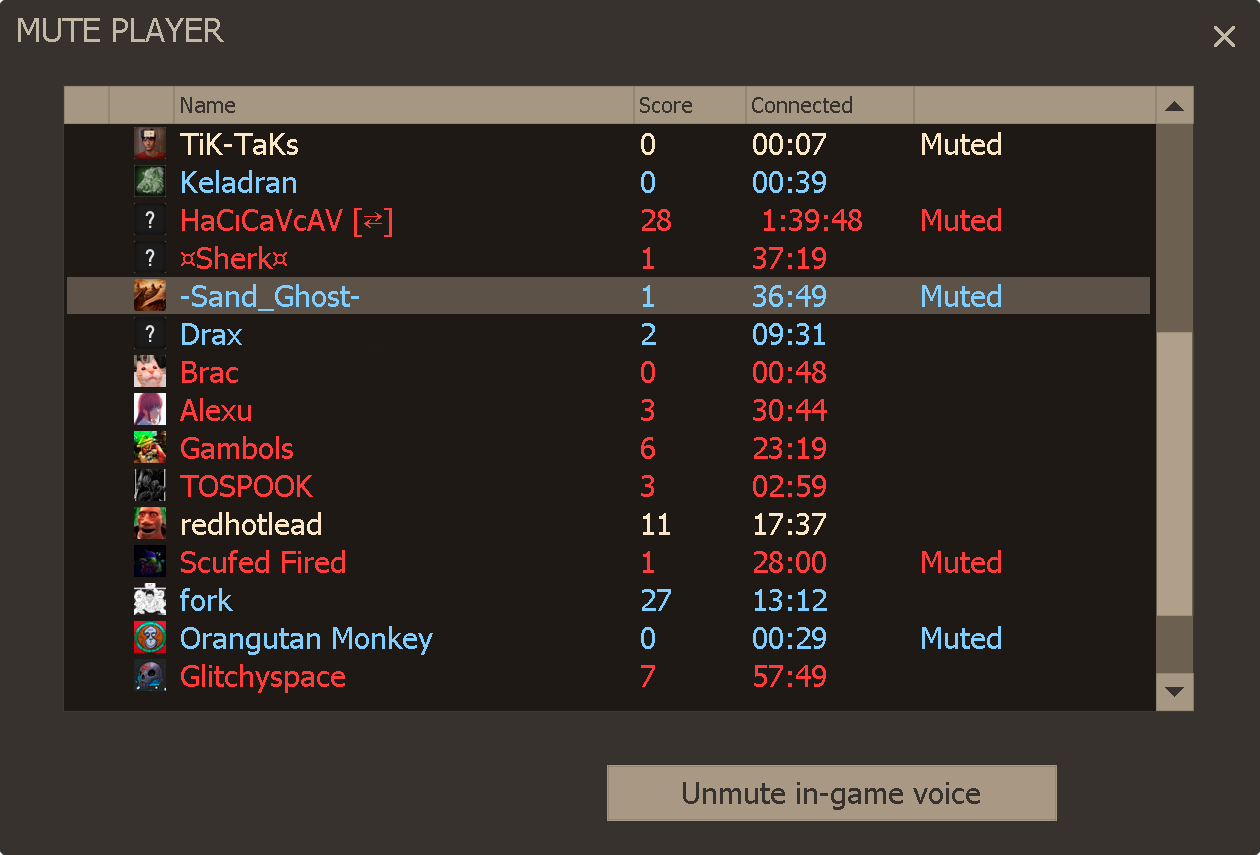
4. Double-click their name.
#### **Multiple Players**
1. Click on the player names you wish to mute while holding `CTRL`.
2. Press `Mute in-game voice`.
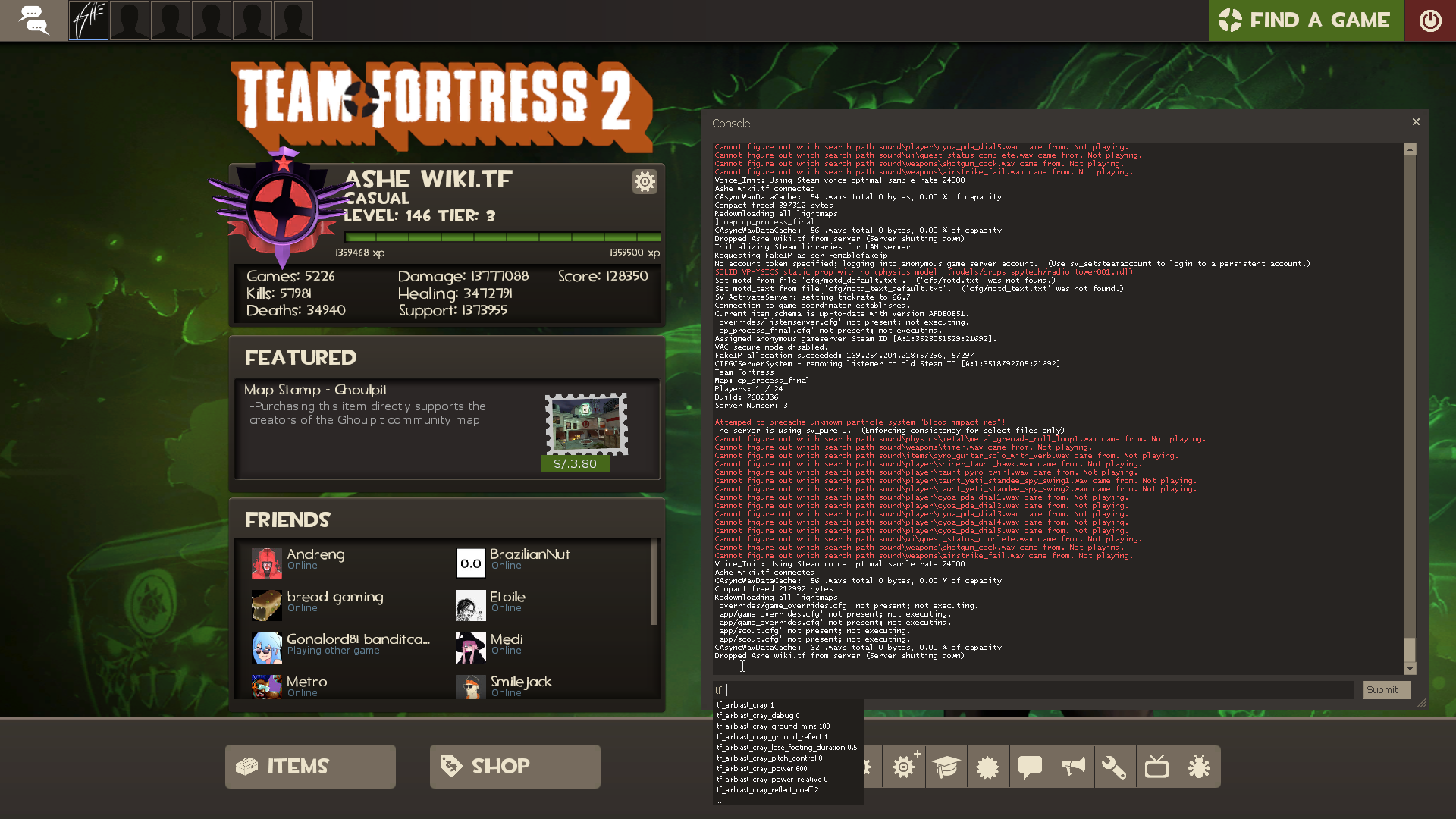
##  How do I disable voice chat?
1. Enable the developer console in your options.\

How do I disable voice chat?
1. Enable the developer console in your options.\

2. Press `` ` ~ `` tilde key on your keyboard. Found next to your `1` key.
3. Type `voice_enable 0` into the console.\
##  How do I report somebody or a bug?
File a new report, or track your previous reports with the link below.
{% content-ref url="/pages/-LT8yPD6\_xunk5mRgvtf" %}
[Broken mention](broken://pages/-LT8yPD6_xunk5mRgvtf)
{% endcontent-ref %}
##
How do I report somebody or a bug?
File a new report, or track your previous reports with the link below.
{% content-ref url="/pages/-LT8yPD6\_xunk5mRgvtf" %}
[Broken mention](broken://pages/-LT8yPD6_xunk5mRgvtf)
{% endcontent-ref %}
##  What is Titan Plus?
It is a monetary contribution program that provides subscribers with a wide range of awesome cosmetic benefits that do not grant any competitive advantage.
It starts at a price of 1 key for every month of subscription, which is equivalent to $2.50 US dollars. Payments made via Paypal can enjoy a small discount.
{% content-ref url="/pages/-LT8z9UjPJcPr7QJVOPz" %}
[Broken mention](broken://pages/-LT8z9UjPJcPr7QJVOPz)
{% endcontent-ref %}
##
What is Titan Plus?
It is a monetary contribution program that provides subscribers with a wide range of awesome cosmetic benefits that do not grant any competitive advantage.
It starts at a price of 1 key for every month of subscription, which is equivalent to $2.50 US dollars. Payments made via Paypal can enjoy a small discount.
{% content-ref url="/pages/-LT8z9UjPJcPr7QJVOPz" %}
[Broken mention](broken://pages/-LT8z9UjPJcPr7QJVOPz)
{% endcontent-ref %}
##  How do I apply for a moderating position?
Submit a new application, or track your previously submitted applications with the link below.
{% content-ref url="/pages/-LT8yMXQ\_Wr7oKA\_69pO" %}
[Broken mention](broken://pages/-LT8yMXQ_Wr7oKA_69pO)
{% endcontent-ref %}
##
How do I apply for a moderating position?
Submit a new application, or track your previously submitted applications with the link below.
{% content-ref url="/pages/-LT8yMXQ\_Wr7oKA\_69pO" %}
[Broken mention](broken://pages/-LT8yMXQ_Wr7oKA_69pO)
{% endcontent-ref %}
##  How do I use a promo code?
Enter promo codes into the link below. Thanks for reading, use the promo code **UNIVERSE** to receive 100 gems!
{% content-ref url="/pages/-LTg7ygCk0htsaT20lUe" %}
[Broken mention](broken://pages/-LTg7ygCk0htsaT20lUe)
{% endcontent-ref %}
How do I use a promo code?
Enter promo codes into the link below. Thanks for reading, use the promo code **UNIVERSE** to receive 100 gems!
{% content-ref url="/pages/-LTg7ygCk0htsaT20lUe" %}
[Broken mention](broken://pages/-LTg7ygCk0htsaT20lUe)
{% endcontent-ref %}